


Kitronik Edu:bit Training & Project Kit for micro:bit - English workbook


Kitronik Edu:bit Training & Project Kit for micro:bit - English workbook


This goes with it
Pay in 30 days
Pay in 30 days
Description
Edu:bit Training & Project Kit for micro:bit (with English learning booklet)
This beginner-friendly micro:bit kit was specifically designed to encourage children to explore STEAM/STEM and learn programming.
You can easily program EDU:BIT with the Microsoft MakeCode editor. Simply add the EDU:BIT MakeCode Extension and you are ready to go. If you are a beginner, you can start with the block programming mode; simply drag and drop the coding blocks together and snap them into place. Advanced users can MakeCode Switch to JavaScript or Python mode in the editor with ease.

This kit includes an English-language booklet with 10+1 hands-on programming lessons, creatively structured to teach the basics of programming in a fun and engaging way. Each chapter includes a classic game such as Rock Paper Scissors, Snakes and Ladders, Twister, and “Simon Says.” Follow the step-by-step instructions to create the games, then have fun playing with your friends!
*Game accessories are included in this kit. At the end of each chapter, there is a challenge in which you must apply what you have learned to create a useful application for your lessons. Give it a try!
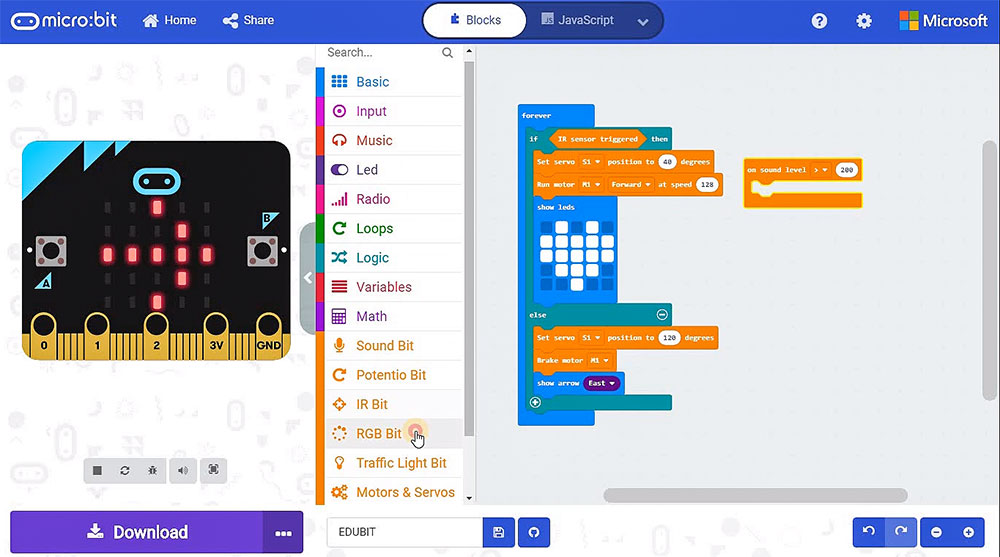
The fun with EDU:BIT starts immediately after unpacking. Start programming right away and see how your board lights up and plays a melody at the push of a button. When used as a training kit, no wiring is required. Can't control the servo motor and play music on your micro:bit at the same time? Is a servo motor refusing to move properly? No more worries! With its dedicated controller and power supply, EDU:BIT takes care of these problems. It can even support up to 3 servo motors and 2 DC motors to power all the creative projects you create.
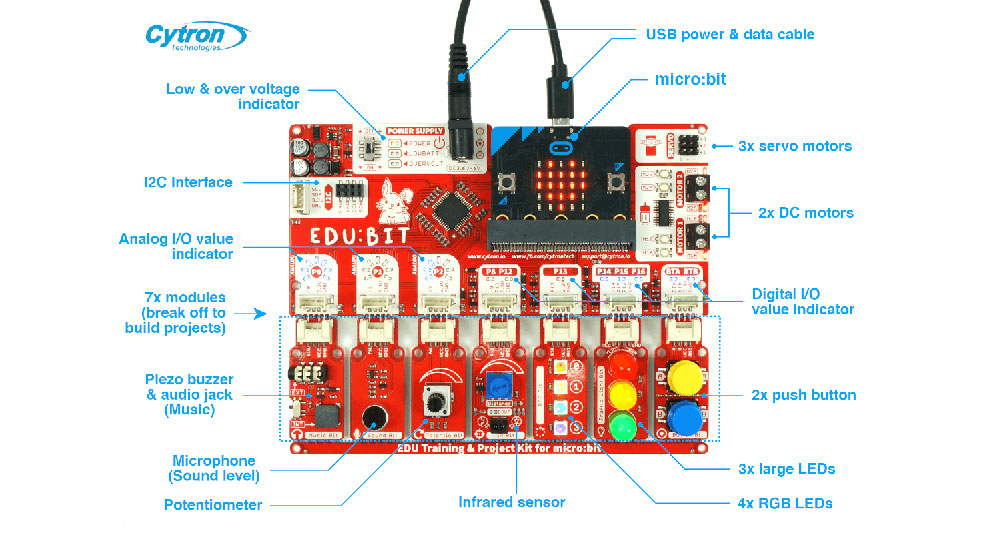
Every function and its associated Microbit -IO pins are clearly marked on the board, making them easy to find. In addition, EDU:BIT has built-in indicator LEDs to make troubleshooting digital and analog IO pins easier.
Ready to build your own projects? You can snap off the modules on the EDU:BIT board for greater flexibility in project design. Plug-and-play cables are included to connect the detached bits to the mainboard.

And last but not least, EDU:BIT even provides a special space where you can write your name. Get yours today!
Note:
Please note: This kit contains none Micro:bit (microcontroller)!
Features:
- This kit was specifically designed to encourage children to explore STEAM/STEM and learn programming.
- Code it with blocks, JavaScript or Python in the MakeCode editor.
- It can be used as an introduction to coding.
- EDU:BIT board features:
- 1 x piezo buzzer with audio jack
- 4 x programmable RGB LEDs
- 1 x sound sensor
- 3 x large LEDs (traffic light module - red, yellow and green)
- 1 x IR sensor
- 2 x push buttons
- 1 x I2C interface connector (3.3 V)
- 3 x servo motor connectors
- 1 x potentiometer
- 2 x DC motor connectors
Dimensions:
- Length: 157.50 mm
- Width: 124.50 mm
- Height: 19.00 mm
Included in delivery:
- An EDU:BIT board
- 1 x USB power and data cable
- 2 x game accessories
- 1 x DC motor
- 7 x Grove cables
- 1 x servo motor
- 2 x playing cards
- 1 x pulley
- Step-by-step instructions
- 1 x fan blade
Requires:
-
1x BBC micro:bit
Product resources / datasheet
- EDU:BIT resource hub (with example code and additional resources).
- EDU:BIT ready-to-use demo code .
- micro:bit - Getting started (from microbit.org)
- MakeCode online editor .
- MakeCode offline editor .
- EDU:BIT schematic, PCB layout and PIC16F1937 coprocessor source code .